01Paste the command above into Terminal and press Return.
02Grant Screen Recording permission when macOS asks (System Settings → Privacy & Security → Screen & System Audio Recording).
03Portal opens automatically — click its menu bar icon and open your first portal.
Or install the DMG
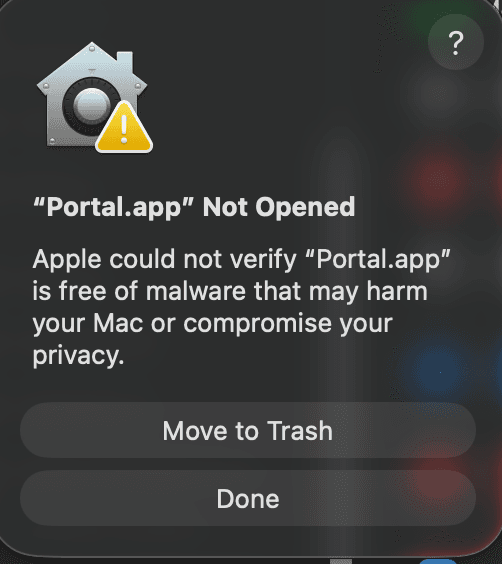
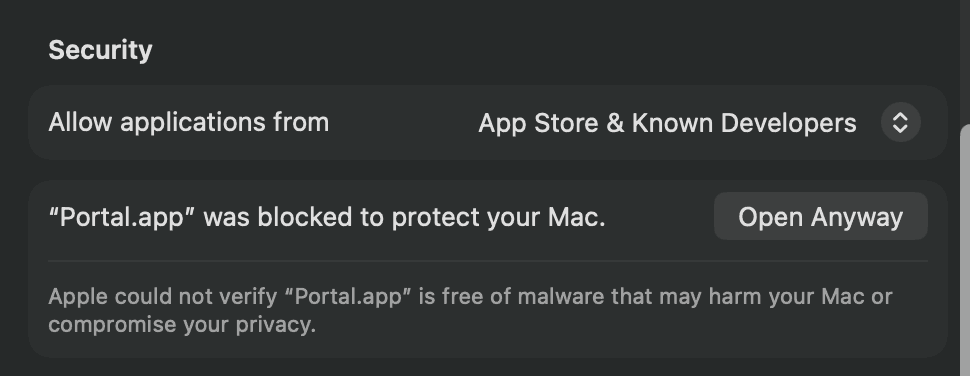
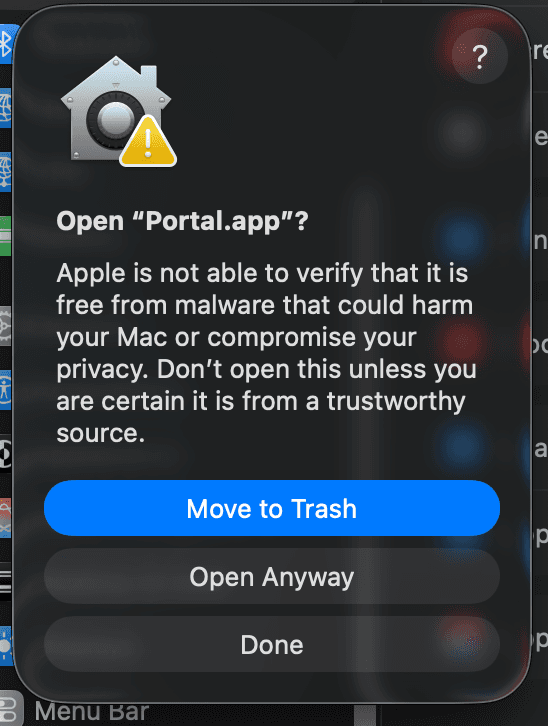
The beta is not notarized by Apple yet, so macOS shows a scary-looking warning. This is expected — here is the one-time approval:
1 — “Not Opened.” Click Done — not Move to Trash.2 — System Settings → Privacy & Security → Open Anyway.3 — Confirm with Open Anyway, and Portal opens.
01Open the DMG and drag Portal into Applications.
02Double-click Portal. Because the beta isn't notarized yet, recent macOS blocks it — “Apple could not verify Portal.app is free of malware.” Click Done (not Move to Trash).
03Open System Settings → Privacy & Security and scroll down — you'll see “Portal.app was blocked.” Click Open Anyway, authenticate, then click Open. (Right-click → Open no longer bypasses this on current macOS.)
04Grant Screen Recording permission when macOS asks (System Settings → Privacy & Security → Screen & System Audio Recording).
05Click the Portal menu bar icon and open your first portal.
Portal mirrors your screen locally, on-device. Nothing is ever uploaded or recorded. Privacy policy